IPTV Extreme Pro
Paolo TurattiVideo Players & Editors
3.8327.00 Reviews
- Version
- 129.0
- Installs
- 500.00K
- Age Rating
- Teen
Screenshots
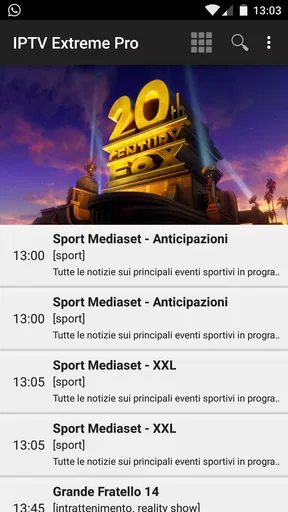
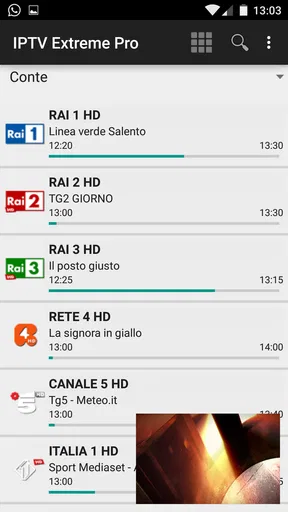



Our Review of IPTV Extreme Pro
 Analysis by Appyee
For anyone already managing an IPTV playlist, the appeal of a dedicated player is easy to understand: one place to organize channels and video on demand, without confusing the player with the service supplying the content. IPTV Extreme Pro is built around that job. I’d consider it when I want control over an existing playlist, not when I expect to install an app and immediately browse a ready-made catalogue.
Speed starts with the playlist, not just the player
My first expectation would be that moving around the app feels quicker than searching through a long playlist by hand. That depends partly on how the playlist is arranged and how responsive its stream sources are, though. A player can make channel selection and browsing more orderly, but it cannot make a slow source deliver video faster. I’d keep that distinction in mind before blaming the app for every pause.
For a smoother first session, I’d begin with a playlist I already know works, then check a few channels and VOD entries before reorganizing everything. This makes it easier to tell whether a problem follows one stream or affects the whole setup. It also avoids spending time customizing a playlist before finding out that its sources are unreliable.
When a long session puts the setup to the test
IPTV use can shift from a quick channel check to a whole evening of live viewing, and those are different tests. During a longer session, the important questions are whether the selected stream stays steady, whether changing channels remains comfortable, and whether the device has enough room to keep the experience pleasant. I wouldn’t assume that a player alone can resolve interruptions caused by a network or stream source.
A practical routine is to save a small group of regular channels as favorites and use that as the starting point for a busy evening. It reduces the need to scan a large list when I only want to put on the news or a match. If something stops playing, trying another known-working entry can help narrow down whether the issue is isolated to one source rather than the entire app.
Reliability means knowing where a fault might be
With IPTV, a frozen picture or a stream that will not start can have several possible causes: the playlist entry, the source, the connection, or the player handling the stream. That makes it useful to troubleshoot in small steps. I’d first try a different entry, then return to the original after checking whether the issue persists. If only one source is affected, repeatedly changing app settings is unlikely to be the most useful next move.
It also helps to keep a copy of the playlist information somewhere safe before making major edits. That is a general playlist-management precaution, not a special feature claim. For someone who relies on a carefully organized setup, being able to restore the source details can save the effort of rebuilding the list if an edit goes wrong.
Device limits and sensible expectations
The app is listed for Android devices running version 5.0 or later, and it is a paid download priced at $0.99. It carries a Teen age rating. Those details make it worth checking the device and purchase requirements before settling on it, especially if you are setting up a family device or comparing several players.
On a smaller screen, a dense channel list can make browsing feel less comfortable than choosing a few favorites first. On a television-sized display, the same playlist may be easier to scan, but the quality of the stream still depends on its source and the connection. I’d treat the player as the organizer and playback tool, not as a guarantee that every device or channel will behave identically.
Paolo Turatti is the developer behind this video player and editor app. It has a 3.8 average from around 12,000 ratings, with over 500,000 installs. The current version is 129.0, and the app was released on October 29, 2015. I see those details as useful context for deciding whether to try it, rather than as a promise that it will suit every playlist or viewing setup.
My performance verdict is measured: it makes most sense when the user’s main need is to manage an IPTV playlist and the underlying streams are already dependable. I would not choose it as a cure for buffering caused elsewhere, nor would I recommend it to someone looking for channels included with the purchase. For that person, a conventional streaming service with its own catalogue is a better fit.
So, you’ve been scouring the web for a solid IPTV app, and you’ve stumbled upon IPTV Extreme Pro. Well, you’re in for a treat! I’ve spent quite a bit of time playing around with this app, and I’m here to spill the beans on what to expect. Grab a snack, sit back, and let’s dive into the world of IPTV streaming.
Getting Started: First Impressions
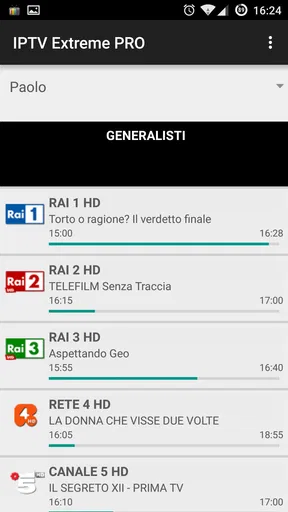
When I first opened IPTV Extreme Pro, I was greeted with a clean and intuitive interface. It’s like the app knew I was coming and decided to roll out the red carpet. The setup was a breeze—just a matter of uploading a playlist, and voilà! I was up and running in no time. If you’re someone who values ease of use, this app already scores major points.
Features Galore
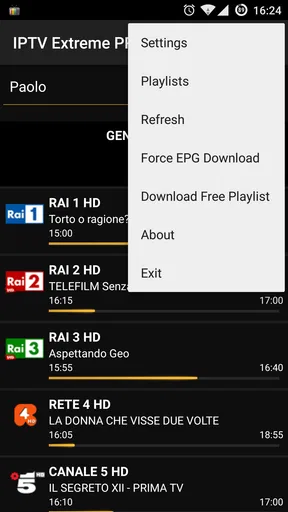
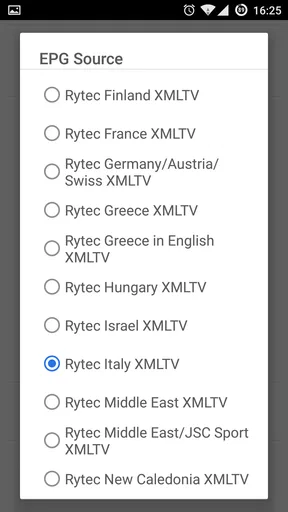
Alright, let’s talk features because this app is loaded. First off, the EPG (Electronic Program Guide) integration is top-notch. I mean, who doesn’t love knowing what’s coming up next? And for those who enjoy a bit of customization, the app allows you to tweak the interface to your liking. Whether it’s changing themes or adjusting the layout, you can make the app feel like it’s truly yours.
One feature that had me impressed was the recording option. Yes, you read that right! You can record your favorite shows to watch later. It’s perfect if you’re like me and can’t always catch live broadcasts. Plus, with the built-in parental control features, you can ensure that the little ones are only watching age-appropriate content.
Streaming Quality
The streaming quality on IPTV Extreme Pro is something to write home about. With a stable internet connection, I experienced minimal buffering, and the video quality was crisp—just how I like it. The app supports various formats, so whether you’re watching on a smartphone or casting to a big screen, the experience remains seamless.
Another nifty feature is the ability to manage your playlist efficiently. You can categorize channels, create favorites, and even use the search function to find what you’re looking for without breaking a sweat. It’s like having your own personalized TV guide at your fingertips.
User Experience and Compatibility
Now, let’s talk about the user experience. The app is snappy and responsive, which is a huge plus. It doesn’t matter if you’re flipping through channels or adjusting settings; the app keeps up with your pace. And the best part? It’s compatible with both Android and iOS. So, no matter your device preference, you’re covered.
One thing to note, though, is that the app doesn’t come with any pre-loaded channels. You’ll need to have your own playlist, which might be a slight hiccup for some. But hey, once you’ve sorted that out, it’s smooth sailing.
The Verdict: Is It Worth It?
So, is IPTV Extreme Pro worth the download? In my humble opinion, absolutely. It offers a robust set of features that cater to both the casual viewer and the hardcore IPTV enthusiast. While there’s a slight learning curve if you’re new to the world of IPTV, the app’s user-friendly design makes it easy to get the hang of things.
In a sea of IPTV apps, IPTV Extreme Pro stands out as a reliable and feature-rich option. Whether you’re looking to catch up on your favorite shows or explore new content, this app has you covered. So, go ahead and give it a whirl. You might just find it’s the streaming companion you’ve been searching for.
Verdict
Strengths of IPTV Extreme Pro
- User-friendly interface with intuitive navigation.
- Supports multiple playlist formats seamlessly.
- Customizable EPG to match your preferences.
- Reliable streaming with minimal buffering.
- Regular updates enhance app performance.
Limitations of IPTV Extreme Pro
- Lacks built-in channel guide for newcomers.
- Some features require manual setup.
- No integrated customer support within app.
- Occasional ads in free version.
- Limited compatibility with older devices.
Similar Picks in This Category
View All
Google TV
Google LLC3.9

iTunes
Apple4.7

YouTube
Google LLC3.8

MX Player
Amazon Mobile LLC4.2

CapCut - Video Editor
Bytedance Pte. Ltd.3.5

PLAYit-All in One Video Player
PLAYIT TECHNOLOGY PTE. LTD.4.5
Frequently Asked Questions
What features does IPTV Extreme Pro offer?
IPTV Extreme Pro provides a wide range of features, including support for EPG (Electronic Program Guide), parental control, and a catch-up feature to watch missed shows. Users can also enjoy Chromecast support, customizable themes, and a built-in player with advanced features like audio track selection and subtitle support.
Is IPTV Extreme Pro easy to set up for new users?
Yes, IPTV Extreme Pro is designed with user-friendliness in mind. New users can easily set up the app by importing playlists via URL or file upload. The app offers a straightforward interface and provides helpful tutorials and FAQs to guide users through the initial setup process.
Does IPTV Extreme Pro support external media players?
Absolutely, IPTV Extreme Pro supports external media players. Users can choose from a variety of media players available on their device to play content, offering flexibility and a personalized viewing experience. This feature is particularly useful for users who have a preferred media player.
Can I use IPTV Extreme Pro on multiple devices?
IPTV Extreme Pro can be installed on multiple Android devices, but it is licensed per device. Users need to purchase the app separately for each device they wish to use it on. This ensures the app functions optimally and provides the best user experience across all devices.
Is IPTV Extreme Pro compatible with iOS devices?
IPTV Extreme Pro is primarily designed for Android devices. Unfortunately, it is not available for iOS users at this time. iOS users will need to look for alternative IPTV apps that are compatible with their devices to enjoy similar features and functionality.
